
A concise and effective bio on TikTok helps boost engagement and encourages interaction between you and your followers.
With a good bio, you can:
- show visitors clearly what your profile is and who you are.
- reach more people.
- show professionalism.
- get a more unique profile.
If you have a bio on TikTok but feel it no longer represents you accurately, you can change it anytime! Follow these steps to change your bio on TikTok:
- Launch the TikTok app. On the bottom right, select your Profile icon.

Click Profile - Click on Edit Profile.
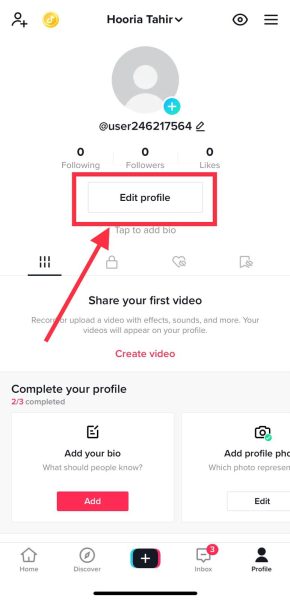
Click on Edit Profile - Here, find the option for Bio. Select Add a bio to your profile next to it.
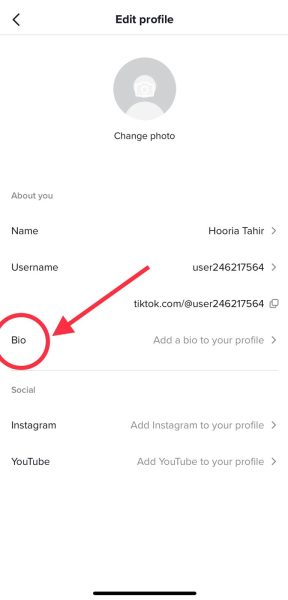
Click on Bio - Type in anything you want for your bio – we recommend keeping it brief and direct! After finalizing your new bio, press Save for it to show on your profile.
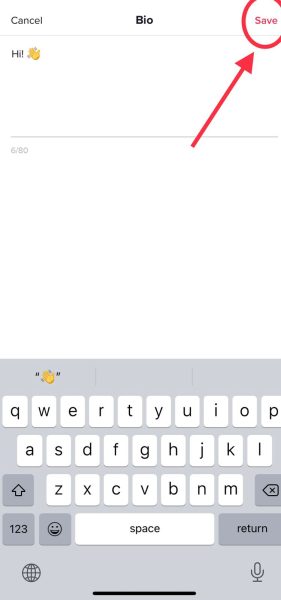
Save your new bio.
I’m Susan, the founder of Learn Social Media. As a caregiver I regularly work with vulnerable groups, such as with the elderly in nursing homes, and children with disabilities in schools. During my work, I noticed these groups struggle to keep up with new technologies.
When it comes to social media, this often led to feelings of isolation and “being left out”. The thrill I experienced creating TikTok dance videos with children with disabilities, or helping elderly folks reconnect with old friends and loved ones on Facebook, is what inspired me to launch this project.
Read more about my project here: About Learn Social Media. Feel free to contact me at any time at [email protected], I spend my evenings responding to ALL messages!